tcpdump
tcpdump is a command-line packet sniffer that can capture and interpret data frames from a file or network interface. It supports Berkeley Packet Filter syntax.
To capture network traffic from the wire, it uses pcap and libpcap with an interface in promiscuous mode. This lets the program see packets sourced from or destined for any device on the local network, not just traffic addressed to the host.
In networking, promiscuous mode allows a network device, such as a network interface card (NIC), to intercept and read every data packet passing through its network segment rather than just packets specifically addressed to it.
| Switch | Result |
|---|---|
-D |
Displays interfaces available for capture. |
-i |
Selects an interface, for example -i eth0. |
-n |
Leaves addresses as numeric values. |
-e |
Captures the Ethernet header as well as upper-layer data. |
-X |
Shows packet contents in hex and ASCII. |
-XX |
Shows packet contents and Ethernet headers. |
-v, -vv, -vvv |
Increases output verbosity. |
-c |
Captures a specific number of packets and then exits. |
-s |
Sets how much of each packet to capture. |
-S |
Converts relative sequence numbers to absolute sequence numbers. |
-q |
Prints less protocol information. |
-r file.pcap |
Reads from a capture file. |
-w file.pcap |
Writes to a capture file. |
The -v, -X, and -e switches increase the amount of data captured, while -c, -n, -s, -S, and -q reduce or reshape the output.
Example
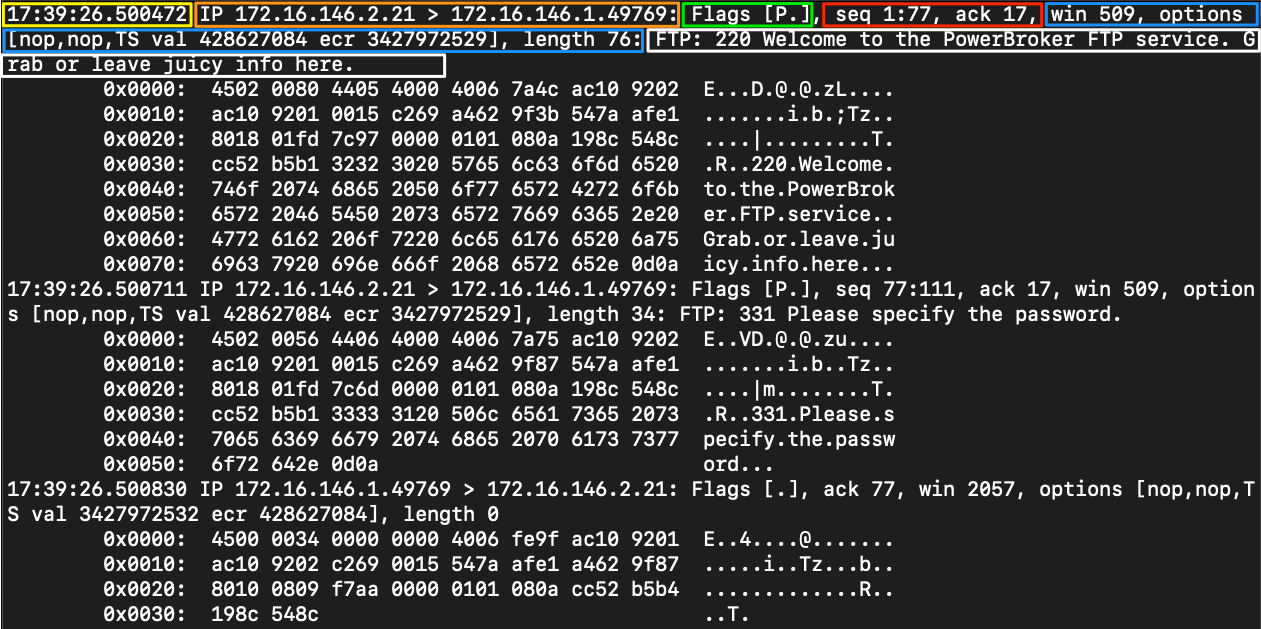
| Field | Meaning |
|---|---|
| Timestamp | Yellow Timestamp field, usually shown in a readable date and time format. |
| Protocol | Orange Upper-layer protocol, such as IP. |
| Source & Destination IP.Port | Orange Source and destination address plus port, for example 172.16.146.2.21. |
| Flags | Green TCP flags in use. |
| Sequence and Acknowledgement Numbers | Red Sequence and acknowledgment numbers for the TCP segment. |
| Protocol Options | Blue Negotiated TCP values such as window size, selective acknowledgements, and window scaling. |
| Notes / Next Header | White Additional dissector notes or encapsulated protocol details. |